
Dashboard Overview
Understand the main SettleWise dashboard and navigation
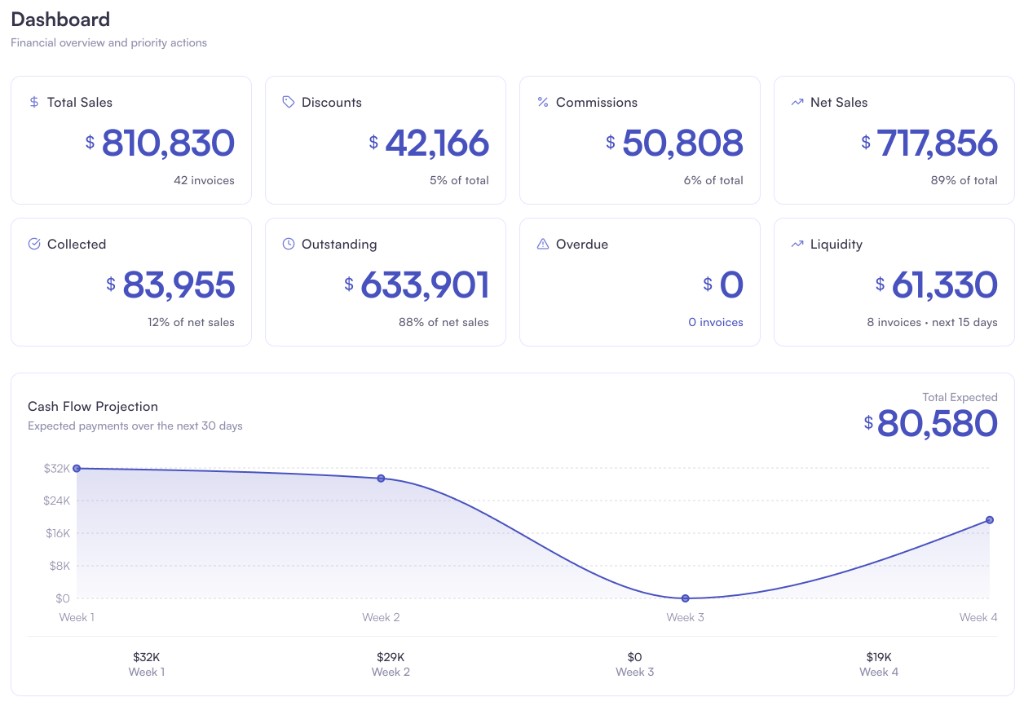
Get a real-time view of sales, collections, and outstanding invoices so you can act on what matters next.
What You'll Learn
- The main sections of the dashboard (Invoices, Payments, Customers, Credits)
- How to navigate using the sidebar
- Quick actions available from the dashboard
Main Sections
Invoices
View and manage all your invoices. You can:
- Create new invoices
- Search and filter invoices
- View invoice details
- Send invoices to customers
- Track payment status
Payments
Track all payments received:
- View payment history
- Record manual payments
- Match payments to invoices
- Process refunds
Customers
Manage your customer database:
- View customer profiles
- Check credit balances
- View payment history
- Manage customer information
Credits
Handle credit memos and customer credits:
- View all credit memos
- Issue refunds
- Rollover credits to next season
- Transfer balances between customers
Navigation
The sidebar provides quick access to:
- Dashboard — Overview and statistics
- Invoices — Invoice management
- Payments — Payment tracking
- Customers — Customer database
- Credits — Credit memo management
- Products — Product catalog
- Registers — Bank accounts and cash registers
- Reports — Financial reports
- Payouts — Business expenses (add-on)
- Notifications — Payment and invoice alerts
- Settings — Organization and user settings
- AI Assistant — Natural language operations
Notifications
The Notifications bell icon in the header shows real-time alerts about your account activity. Click it to open the notification center.
| Notification Type | What it tells you |
|---|---|
| Payment received | A new payment has arrived (pending) |
| Payment completed | A payment was validated and posted to QuickBooks |
| Payment rejected | A payment match was rejected |
| Evidence added | New evidence was attached to a payment |
| Invoice created | A new invoice was generated |
| Invoice paid | An invoice was partially or fully paid |
| Assign customer | A payment needs a customer assignment (unknown sender) |
| Assign invoice | A payment's customer was found, but no matching invoice |
| Duplicate detected | A potential duplicate payment was found |
| Overdue invoice | An invoice is overdue by 3+ days |
Notifications have priority levels (urgent, high, normal, low) shown as color-coded badges. You can filter by All / Unread / Read, and mark notifications as read individually or in bulk.
Quick Actions
From the dashboard, you can quickly:
- Create a new invoice
- Add a manual payment
- Search for customers or invoices
- Access the AI assistant